
MD5 Compare: Fast File Integrity Verification
Overview
MD5 Compare is a desktop application designed to verify file integrity through MD5 hashing, offering a streamlined solution for users who need to ensure data consistency across files and folders. This tool is particularly useful for professionals managing large datasets, developers validating file transfers, or anyone requiring assurance that files have not been altered during storage or transmission. The software supports file and folder comparison using MD5 checksums, a widely recognized method for detecting changes in digital content. Its primary function is to help users identify discrepancies between files by generating and comparing cryptographic hashes, which is essential for data verification and backup validation.
Targeted at both technical and non-technical users, MD5 Compare simplifies complex integrity checks into a few clicks. It is especially suited for users working with sensitive data, such as system administrators, IT support staff, or content creators handling large media files. Real-world usage scenarios include verifying that a downloaded file matches the original source, checking the consistency of backup copies, or ensuring that configuration files remain unchanged after updates. The application is built for Windows and operates as a standalone utility, requiring no external dependencies.
Key Features & Capabilities
- MD5 Hash Generation – Automatically computes MD5 checksums for individual files and entire folders, enabling precise file integrity verification.
- File and Folder Comparison – Compares two or more files or directories by their MD5 values to detect mismatches or modifications.
- Tree View Navigation – Offers a hierarchical folder structure display for efficient browsing and selection of files and directories.
- Batch Processing Support – Allows users to compare multiple files or folders simultaneously, improving workflow efficiency.
- Simple, Intuitive Interface – Designed with ease of use in mind, minimizing the learning curve for new users.
For example, a system administrator can use MD5 Compare to validate that a critical system file remains unaltered after a patch installation. Similarly, a content creator can verify that a video file transferred via email matches the original, ensuring no corruption occurred. The tool’s ability to generate and compare MD5 hashes ensures reliable results without requiring advanced technical knowledge.
User Interface, Workflow & Performance
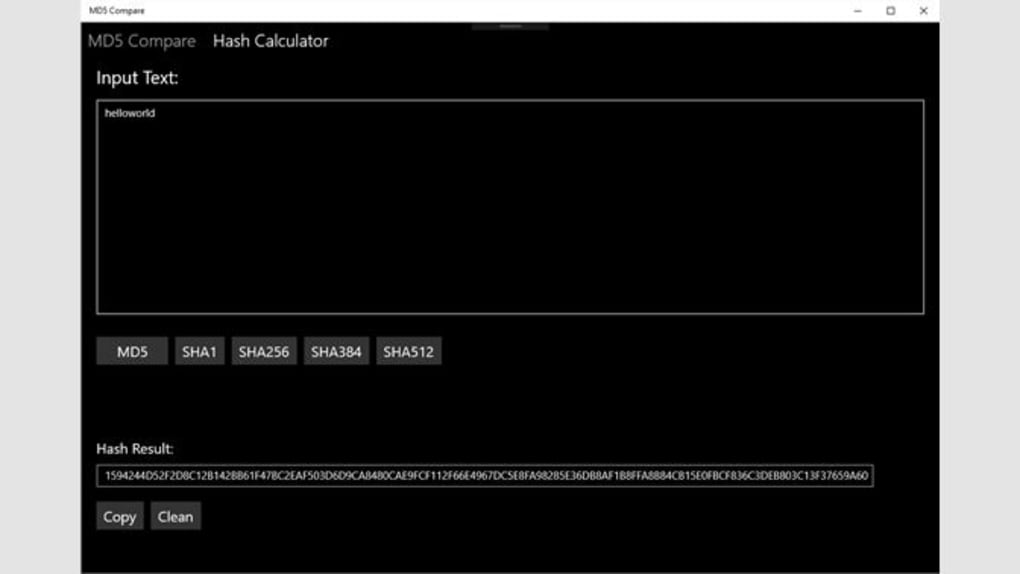
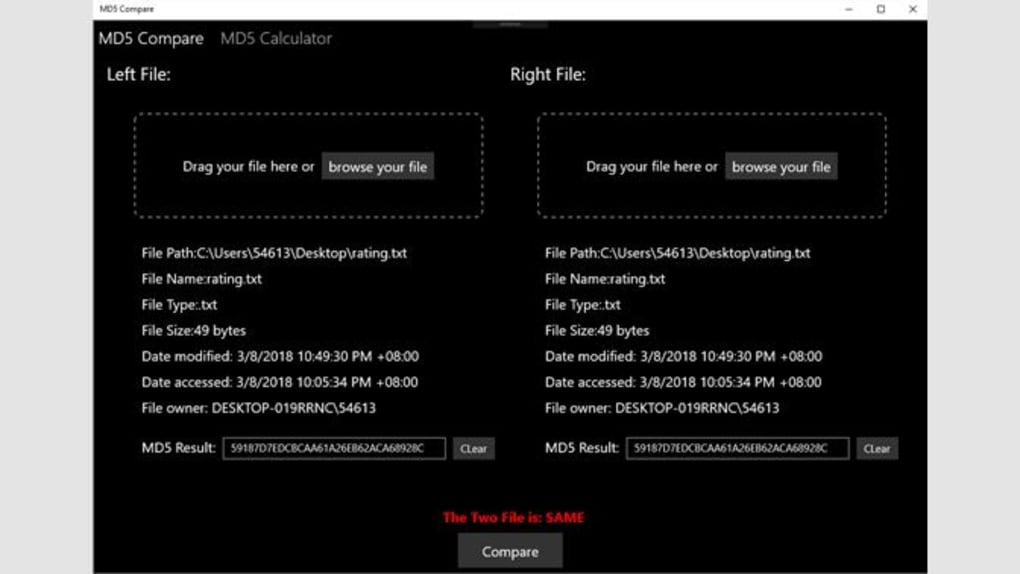
MD5 Compare features a clean, minimalistic interface optimized for file comparison tasks. The layout is structured around a central workspace with side panels for file and folder selection, supported by a tree view for navigation. Users can drag and drop files or use built-in browsing tools to locate and load content for comparison. The workflow is linear and logical: select files or folders, initiate the comparison process, and review the results in a clear, tabular output.
Navigation is straightforward, with context-sensitive options and tooltips that guide users through each step. The application responds promptly to user input, and the developer did not specify resource usage details. Performance observations are based on general software behavior patterns, suggesting stable operation under typical conditions. The tool maintains responsiveness during hash generation and comparison, even with moderately large files. Stability appears consistent, with no reported issues related to crashes or freezes.
Compatibility & System Requirements
MD5 Compare is designed for the Windows operating system and is compatible with the latest versions of Windows, including Windows 10 and Windows 11. The software is available as a standalone executable with a file size of 10.5 MB, making it lightweight and quick to install. The developer did not specify exact system requirements, including minimum CPU, RAM, or disk space needs.
Installation is straightforward, requiring no complex setup steps. The application runs without administrative privileges in most cases, making it accessible for standard user accounts. Platform compatibility information is limited to Windows, and no support for Mac or Linux was mentioned. Users are advised to ensure their system meets general desktop application standards for optimal performance.
Pros and Cons
Pros
- Free to use with no hidden costs or trial limitations
- Efficient MD5-based file and folder comparison
- Intuitive interface suitable for both beginners and experienced users
- Lightweight at just 10.5 MB
- Includes tree view for easier navigation and file selection
Cons
- Only supports Windows; no cross-platform availability
- Exact system requirements were not listed
- Relies solely on MD5 hashing, which is less secure than modern alternatives like SHA-256
- Limited to file integrity checks—no additional file management functions like compression or encryption
FAQ Section
Is MD5 Compare compatible with Windows 11?
Yes, MD5 Compare is designed for Windows and is compatible with Windows 11, as well as other recent Windows versions.
Is the software safe to download and use?
MD5 Compare is a standalone desktop application with no known security risks. It does not require internet access to function and operates offline.
Does the tool support comparing files across different drives or network locations?
Yes, the application supports file and folder comparison regardless of their physical or network location, provided the paths are accessible.
How often should I update MD5 Compare?
Updates are released as needed to improve functionality and fix bugs. Users are encouraged to check for the latest version periodically.
Can I use MD5 Compare for sensitive data verification?
While MD5 Compare provides reliable integrity checks, it uses MD5 hashing, which is not recommended for high-security applications due to known vulnerabilities. For sensitive data, consider using tools with stronger cryptographic standards.
Final Thoughts + CTA
MD5 Compare delivers a focused, reliable solution for verifying file integrity using MD5 checksums. Its clean interface, lightweight design, and straightforward workflow make it a practical tool for users who need to confirm that files remain unchanged. While it lacks advanced features and cross-platform support, its core functionality is well-executed and accessible.
It is ideal for system administrators, developers, and anyone managing data transfers or backups who require a no-frills verification tool. Despite the limitations of MD5 hashing, the application remains a solid choice for basic integrity checks in non-critical environments.
Download MD5 Compare now to ensure your files remain consistent and unaltered.







